The golden rule of WordPress development: never edit your parent theme files directly. Every time that theme updates, your changes are erased. The fix is a child theme — a small folder that holds your customisations safely, completely separate from the parent.
Most tutorials tell you to install the Child Theme Configurator plugin. That is unnecessary. Installing a plugin just to generate two small text files adds database entries, slows your dashboard, and leaves an active plugin running forever on your site.
This guide shows you three clean methods to create a WordPress child theme without any plugin — in order from fastest to most hands-on:
- Free online generator (10 seconds, no code)
- cPanel File Manager (5 minutes, no FTP client needed)
- Manual FTP / local file creation (for developers)
You will also find a complete slug reference table for 25+ popular themes and a troubleshooting section for the most common errors.
What Is a WordPress Child Theme and Why Do You Need One?
A child theme is a subdirectory inside wp-content/themes/ that inherits all the design and functionality of a parent theme. It contains, at minimum, two files:
style.css— declares the child theme’s name and which parent it belongs tofunctions.php— enqueues the parent theme’s stylesheet so styles load correctly
Any CSS you add to the child’s style.css overrides the parent. Any PHP you add to the child’s functions.php runs on top of the parent’s functions. When the parent theme updates, your child theme folder is untouched — your work is safe.
Without a child theme, a single click on “Update” in your WordPress dashboard deletes every CSS tweak and PHP modification you made to the parent.
Method 1: Free Online Generator (Fastest — No Code)
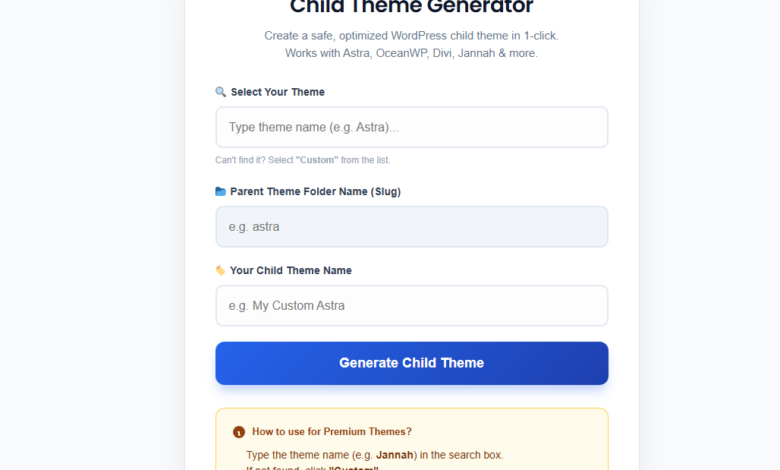
If you want to skip everything and just get the files, use the free generator tool on this site. It builds the correct style.css and functions.php for your specific theme, packages them into a .zip, and you upload it to WordPress exactly like a regular theme.
⚡ Free Tool
WordPress Child Theme Generator
Type your theme name, click Generate, download the .zip. Works for Astra, Divi, OceanWP, GeneratePress, and 100+ themes. Zero plugins needed on your site.
Steps after downloading:
- Go to
Appearance → Themes → Add New - Click Upload Theme
- Select the downloaded
.zipfile - Click Install Now, then Activate
Done. Your child theme is active and your parent theme files are protected.
Method 2: Create a Child Theme via cPanel File Manager (No FTP Client)
This method works entirely inside your hosting control panel. No software to install, no FTP credentials to configure.
Step 1 — Find your parent theme’s folder name
Before creating any files, you need the exact folder name of your parent theme. Log into cPanel and navigate to:
File Manager → public_html → wp-content → themes
You will see a list of folders. The folder name of your theme is its slug. Write it down exactly — spelling and capitalisation matter. For Astra it is astra. For Divi it is Divi (capital D). See the full slug table below.
Step 2 — Create the child theme folder
Still inside the themes directory, click + Folder in the top toolbar. Name it your-theme-slug-child. Examples:
- Astra →
astra-child - Divi →
Divi-child - OceanWP →
oceanwp-child - GeneratePress →
generatepress-child
Step 3 — Create style.css
Open the new child folder. Click + File and name it style.css. Open the file and paste the following — replacing astra with your actual parent theme slug:
/*
 Theme Name:   Astra Child
 Template:     astra
 Author:       Your Name
 Version:      1.0.0
 Description:  Child theme for Astra
*/
The Template: line is the critical one. It must exactly match the parent theme’s folder name. This is where 90% of errors happen.
Step 4 — Create functions.php
Create another new file in the same folder and name it functions.php. Paste this code:
<?php
/**
 * Enqueue parent theme stylesheet.
 * Using wp_enqueue_scripts is the correct method recommended by WordPress.org.
 * Do NOT use @import in style.css — it causes an extra HTTP request.
 */
add_action( 'wp_enqueue_scripts', 'child_theme_enqueue_styles' );
function child_theme_enqueue_styles() {
    wp_enqueue_style(
        'parent-style',
        get_template_directory_uri() . '/style.css'
    );
}
Important: Do not use the old @import url('../parent-theme/style.css') method still found in many outdated tutorials. It fires a separate HTTP request for the stylesheet and hurts your Google PageSpeed score. The wp_enqueue_scripts method above is the WordPress.org recommended approach.
Step 5 — Activate the child theme
Go to WordPress Dashboard → Appearance → Themes. You should see your new child theme listed. Click Activate.
Your site will look identical to before — the child theme inherits all parent styles. The difference is that any CSS or PHP changes you make going forward are now protected from theme updates.
Method 3: Manual Creation via FTP (For Developers)
If you prefer working locally or with an FTP client like FileZilla or Cyberduck, the process is the same as Method 2 — you just create the files locally first.
- Create a new folder on your computer named
your-theme-slug-child - Create
style.cssinside it with the header from Step 3 above - Create
functions.phpinside it with the enqueue code from Step 4 above - Connect to your server via FTP and upload the entire folder to
/wp-content/themes/ - Activate via
Appearance → Themes
Alternatively, compress the folder into a .zip and upload it via Appearance → Themes → Add New → Upload Theme — same as the generator method.
Correct Theme Slugs for 25+ Popular WordPress Themes
The Template: line in style.css must exactly match the folder name of the parent theme. Here are the correct slugs for the most commonly used themes:
| Theme Name | Correct Slug (Template:) | Note |
|---|---|---|
| Astra | astra |
All lowercase |
| Divi | Divi |
⚠ Capital D required |
| OceanWP | oceanwp |
All lowercase |
| GeneratePress | generatepress |
All lowercase |
| Hello Elementor | hello-elementor |
With hyphen |
| Kadence | kadence |
All lowercase |
| Neve | neve |
All lowercase |
| Storefront | storefront |
WooCommerce default theme |
| Blocksy | blocksy |
All lowercase |
| Avada | Avada |
⚠ Capital A required |
| Newspaper | Newspaper |
⚠ Capital N required |
| Flatsome | flatsome |
All lowercase |
| Woodmart | woodmart |
All lowercase |
| Jannah | jannah |
All lowercase |
| Enfold | enfold |
All lowercase |
| Porto | porto |
All lowercase |
| Salient | salient |
All lowercase |
| Hestia | hestia |
All lowercase |
| Zakra | zakra |
All lowercase |
| Twenty Twenty-Five | twentytwentyfive |
No spaces or hyphens |
| Twenty Twenty-Four | twentytwentyfour |
No spaces or hyphens |
| Soledad | soledad |
All lowercase |
| Any other theme | check folder name |
Open File Manager → wp-content/themes/ and copy the folder name exactly |
Don’t see your theme here? The free generator tool has a database of 100+ themes with pre-configured slugs — just search and generate.
What to Do After Activating Your Child Theme
Once your child theme is active, you have a clean base to work from. Here is how to make changes correctly:
Adding custom CSS
Add your CSS to the bottom of the child theme’s style.css file. Your rules will automatically override the parent theme because WordPress loads child theme styles after parent styles.
/* Add your custom CSS below this line */

/* Example: change heading colour */
h1, h2, h3 {
    color: #1a202c;
}

/* Example: adjust container width */
.site-content {
    max-width: 1200px;
}
Adding custom PHP functions
Add your functions to the child theme’s functions.php, below the existing enqueue code. Never delete the wp_enqueue_scripts function — that is what loads the parent styles.
<?php
// Keep the existing enqueue function above, then add your functions below:

// Example: remove WordPress emoji scripts
function disable_emojis() {
    remove_action( 'wp_head', 'print_emoji_detection_script', 7 );
    remove_action( 'wp_print_styles', 'print_emoji_styles' );
}
add_action( 'init', 'disable_emojis' );

// Example: add custom image size
add_image_size( 'featured-thumbnail', 800, 450, true );
Overriding parent template files
To change how a specific page or section is rendered — such as the header, footer, or single post layout — copy the relevant PHP file from the parent theme into your child theme folder with the same file name. WordPress always uses the child theme’s version first.
For example, to override the header: copy header.php from the parent into your child theme folder, then edit it there.
Troubleshooting: Common Child Theme Errors
“Broken Theme: Template is missing”
This is the most common error and it always means the same thing: the Template: line in your style.css does not match the parent theme’s folder name. Fix it by:
- Opening cPanel → File Manager →
wp-content/themes/ - Copying the parent theme’s exact folder name (check capitalisation carefully)
- Editing your child theme’s
style.cssand updating theTemplate:line
My site looks unstyled / broken after activating the child theme
The parent stylesheet is not loading. This happens when the functions.php file is missing or contains a PHP error. Check:
- The file is named exactly
functions.php(notfunction.phporFunctions.php) - The file starts with
<?phpand there is no space or character before it - The
wp_enqueue_stylehandle is'parent-style'— do not change this - You are not using the old
@importmethod instyle.css
My child theme does not appear in Appearance → Themes
WordPress requires the style.css file to exist and contain at minimum the Theme Name: and Template: header lines. If either is missing or malformed, the theme is invisible. Double-check both files exist inside a folder in wp-content/themes/.
My custom CSS is not applying
Check two things: first, make sure you are editing the child theme’s style.css, not the parent’s. Second, your CSS rules may need to be more specific than the parent’s rules. Use your browser’s Inspector tool (right-click → Inspect) to see which rule is winning and increase your selector specificity.
My child theme disappeared after updating the parent theme
Child themes are never deleted by parent theme updates — they are separate folders. If your child theme disappeared, it may have been manually deleted or your hosting may have reset. Always keep a backup of your child theme folder.
💡 Skip the manual steps entirely
The free Child Theme Generator handles the slug lookup, correct enqueue method, and file packaging for you — in under 10 seconds. Useful for client sites where you need to move fast.
Need it done for you?
Need Custom WordPress Development?
I can set up your child theme, add custom CSS and PHP functions, fix styling conflicts, or build a fully custom WordPress site from scratch. Starting at $10 on Fiverr.
Summary
Creating a WordPress child theme without a plugin takes less than five minutes when you know the three things that matter: the correct folder structure, the exact parent theme slug, and using wp_enqueue_scripts instead of @import to load parent styles.
If you just need the files quickly and want to skip the manual steps, the free generator tool handles everything automatically for any theme.
Once your child theme is active, all your CSS and PHP customisations live safely in that folder — untouched by every future parent theme update.
Related Guides
- Free WordPress Child Theme Generator — Generate a ready-to-upload .zip for any theme in 10 seconds
- WordPress Speed Optimization: Top 10 Plugins That Actually Work
- 5 Signs Your Website Was Built by an Amateur — including child theme mistakes