
Simple Click to Chat for WA – The World’s Lightest WhatsApp Plugin for WordPress
Do you want to add a floating WhatsApp chat button to your WordPress website, but you are afraid of slowing down your site?
You are right to be concerned. Most chat plugins in the market are bloated. They load heavy JavaScript files, depend on jQuery, and often include tracking scripts that hurt your Google PageSpeed score. As a developer who prioritizes performance, I wanted a solution that was fast, secure, and simple.
That is why I built Simple Click to Chat for WA.
Why This Plugin is Different?
The philosophy behind this plugin is “Zero Bloat.” Unlike others, this plugin does not load any external CSS or JS files. It is built using Pure CSS and weighs only about 17 KB.
Key Features:
- 🚀 Super Lightweight: It adds zero load time to your website.
- ⚡ No jQuery or JavaScript: It runs on pure HTML & CSS, ensuring no render-blocking issues.
- 📱 Smart Device Detection:
- On Mobile: Opens the WhatsApp App directly.
- On Desktop: Opens WhatsApp Web in a new tab.
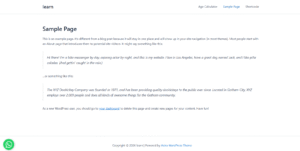
- 🎨 Position Control: Easily switch the button position between the Bottom Right or Bottom Left to avoid overlapping with your theme’s “Scroll to Top” button.
- 🛡️ Secure & Clean: No tracking codes, no ads, and follows strict WordPress security standards.
How to Use It?
Using this plugin is as simple as it gets. No complex configuration is required.
- Install and Activate the plugin.
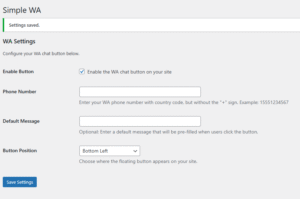
- Go to your Dashboard > Settings > Simple Click to Chat for WA.
- Enter your WhatsApp Number (with country code).
- (Optional) Add a pre-filled welcome message.
- Select your preferred position (Left or Right) and click Save.
That’s it! A beautiful, lightweight WhatsApp button will now appear on your site, ready to connect you with your visitors instantly.
Download Information:
This plugin is currently being reviewed for the official WordPress Repository. Stay tuned for the download link!