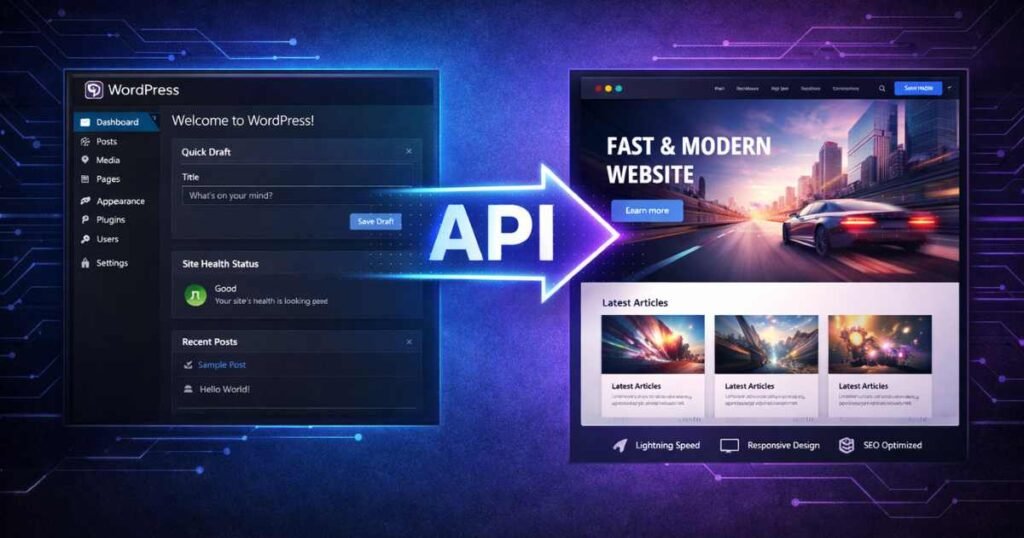
You’ve probably heard the word “headless” thrown around in WordPress circles over the past few years. Maybe a developer mentioned it. Maybe you saw it in a newsletter and glossed over it. Maybe you’re a business owner who just wants your website to load fast and look great — and you’re wondering if this headless thing actually matters to you.
Here’s the honest answer: full headless WordPress is powerful, but for most small and medium-sized businesses, it’s overkill. It introduces complexity, cost, and maintenance overhead that simply isn’t justified unless you’re running a high-scale enterprise app or a multi-platform content operation.
But hybrid headless? That’s a different story. In 2026, hybrid headless WordPress has hit a sweet spot — combining the familiarity and flexibility of WordPress with the performance and user experience advantages of modern frontend frameworks. It’s not all-or-nothing anymore. And that changes who this architecture is actually right for.
In this guide, I’m going to walk you through exactly what hybrid headless means, how it differs from full headless, who it genuinely benefits, and where it falls short. No hype. No developer jargon for its own sake. Just a clear-headed look at whether this is a smart move for your business in 2026.
| Who This Guide Is For
Small to medium business owners, marketing managers, and entrepreneurs who’ve heard about headless WordPress and want a no-nonsense breakdown before making any decisions. Also useful for developers advising clients on architecture choices. |
First, What Actually Is Headless WordPress?
To understand hybrid headless, you need to understand the standard WordPress model first — and why some people want to move away from it.
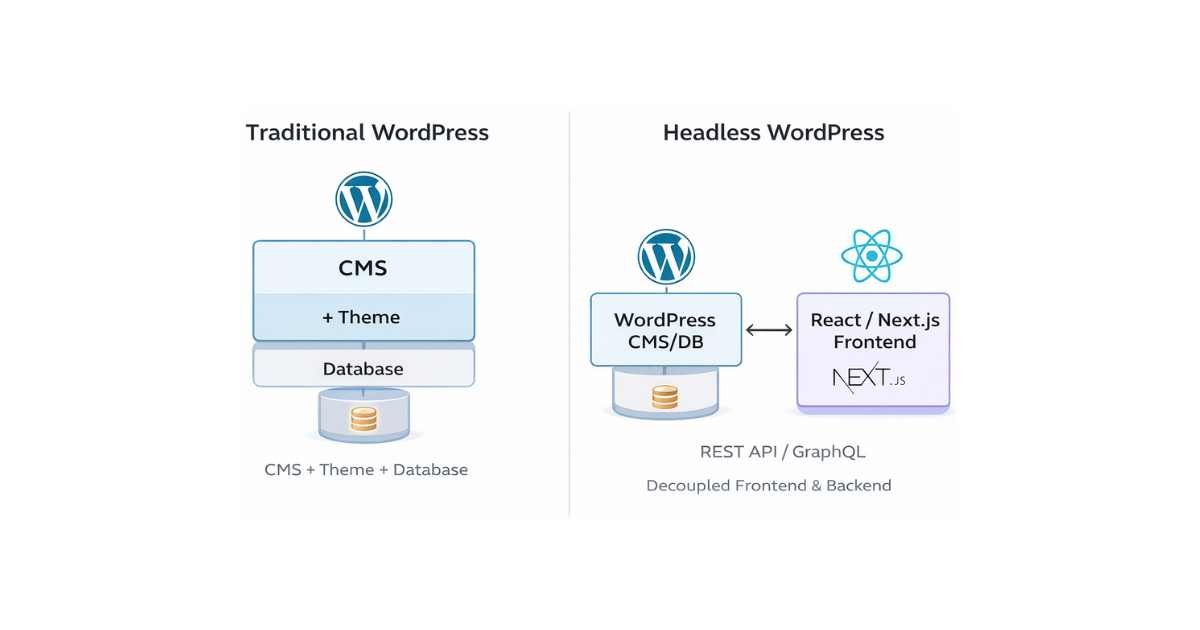
Traditional WordPress is a monolithic system. The backend (where you manage content — posts, pages, settings) and the frontend (what your visitors see in their browser) are tightly connected. When a visitor lands on your site, WordPress processes the request, queries the database, renders the HTML using your theme’s PHP templates, and delivers it to the browser. Everything happens in one place, on one system.
It works. Billions of websites run this way. But it has limitations — primarily around performance ceiling, frontend flexibility, and the ability to deliver content across multiple platforms simultaneously.
Headless WordPress disconnects those two layers. WordPress handles only the backend — content management, the database, media, user roles. The frontend is built separately using a modern JavaScript framework like Next.js, Nuxt, Gatsby, or Astro. The two communicate through an API — either WordPress’s built-in REST API or GraphQL via a plugin like WPGraphQL.
Full Headless vs. Hybrid Headless — What’s the Difference?
This is where most articles get vague. Let me be specific.
Full Headless WordPress
In a fully headless setup, WordPress is completely stripped of its frontend responsibilities. Your theme becomes irrelevant (or nonexistent). Visitors never interact with WordPress directly. The frontend is an entirely separate application — deployed on its own infrastructure, built with its own technology stack, consuming WordPress data via API calls.
This gives you maximum flexibility. Your frontend can be a React app, a mobile app, a voice interface, a smart TV app — whatever consumes the API. But that flexibility comes with real costs: you need developers who know both WordPress and modern JavaScript frameworks, you’re managing two separate systems, and every content change needs to work correctly across both layers.
Hybrid Headless WordPress
Hybrid headless takes a more pragmatic approach. Instead of replacing WordPress’s frontend entirely, it selectively decouples parts of the stack — typically the most performance-sensitive or user-facing parts — while keeping WordPress’s native rendering for simpler or less critical areas.
A common hybrid pattern looks like this: WordPress handles your blog, standard pages, and admin interface normally. But your homepage, product landing pages, or checkout flow are built as a Next.js application that pulls data from WordPress via API. The visitor experiences the fast, modern frontend where it matters most, while you still manage everything from the familiar WordPress dashboard.
| The Key Distinction
Full headless is all-or-nothing. Hybrid headless is selective. You get modern frontend performance on the pages that need it most, without rebuilding your entire content management workflow from scratch. This is exactly why it has become the preferred approach for small and medium businesses in 2026. |
Here’s a side-by-side comparison:
| Full Headless | Hybrid Headless | |
| Setup Complexity | Very High | Moderate |
| Developer Cost | High (WP + JS dev) | Medium |
| Performance Gains | Maximum | Significant |
| CMS Flexibility | Full control | Full control |
| Theme Required | No | Partial |
| Hosting Cost | High (two systems) | Medium |
| Best For | Enterprise / Apps | SMB / Growing Sites |
| Time to Launch | Months | Weeks |
How Hybrid Headless Actually Works in Practice
Let me give you a concrete example rather than staying abstract.
Imagine you run a mid-sized e-commerce brand. You’ve been on WordPress and WooCommerce for years. Your site works, but your PageSpeed scores are poor, your mobile experience feels clunky, and your developers keep running into limits when they want to build custom interactive features.
A hybrid headless approach for this business might look like this: your WordPress installation stays exactly as it is — WooCommerce, your products, your blog, your content editors who already know how to use the dashboard. None of that changes. Behind the scenes, a Next.js frontend application is deployed on a platform like Vercel or Netlify. That application fetches your product data, blog posts, and page content from WordPress via the REST API or WPGraphQL, then renders blazing-fast static or server-rendered pages for your visitors.
Your marketing team still publishes posts and updates products in WordPress exactly as before. Your customers experience a dramatically faster, more modern website. And your developers have the freedom to build interactive features — animated product showcases, personalized recommendations, real-time cart updates — using the full power of modern JavaScript.
The Technical Building Blocks
- Data layer — connects WordPress content to your frontend: WordPress REST API or WPGraphQL
- Frontend framework — renders pages with speed and flexibility: js, Nuxt, or Astro
- Frontend hosting — global CDN delivery with zero server management: Vercel, Netlify, or Cloudflare Pages
- Rebuilds only changed pages automatically — keeps content fresh without full rebuilds: Incremental Static Regeneration (ISR)
- Your editors never notice the change — the dashboard experience is identical: WordPress as CMS only
The Real Benefits for Small and Medium Businesses
Let’s be direct about what hybrid headless actually delivers — and whether those benefits are worth pursuing for a business at your scale.
1. Genuine Performance Improvements
This is the most tangible benefit and the one that matters most for SEO and conversions. A Next.js frontend served from Vercel’s global edge network will consistently outperform a traditional WordPress site on a shared hosting stack. We’re talking about sub-second page loads, 90+ Core Web Vitals scores across the board, and a mobile experience that feels native-app smooth.
For businesses where performance directly impacts revenue — e-commerce, lead generation, booking platforms — this isn’t a nice-to-have. A one-second improvement in load time is measurable in conversions. Google’s own data suggests that moving from a 3-second to a 1-second load time can increase conversions by up to 27%.
2. Editorial Workflow Stays Familiar
One of the biggest objections to going headless is the disruption to content teams. With full headless, your editors suddenly lose access to the familiar WordPress preview experience and must adapt to new workflows. With hybrid headless, your WordPress dashboard is unchanged. Your editors still create posts, update pages, and manage media exactly as they always have. The complexity lives entirely in the developer layer — invisible to non-technical team members.
3. Better Developer Experience for Custom Features
If you’ve ever asked a WordPress developer to build something truly custom — a complex animated section, a real-time filtering experience, an interactive data visualization — you’ve probably encountered the limitations of PHP-rendered templates. Modern JavaScript frameworks are simply better tools for building rich interactive interfaces. Hybrid headless gives your development team those tools without abandoning the content management system that already works.
4. Multi-Channel Content Delivery
Once your content lives in WordPress and is accessible via API, it becomes reusable. Your blog posts can power your website AND a native mobile app AND an email newsletter digest tool — all from the same single source of truth. For businesses starting to think about omnichannel content strategies, this architecture is a natural foundation.
5. Future-Proofing Without Starting Over
Technology changes fast. The ability to swap or upgrade your frontend independently of your content management layer gives you strategic flexibility. You’re not locked into a single vendor’s theming system or a particular version of a page builder. When a better frontend technology emerges, you can migrate gradually without rebuilding your content infrastructure.
The Honest Downsides You Need to Know
Hybrid headless isn’t the right choice for everyone. Here are the real challenges — and the scenarios where it simply isn’t worth the investment.
1. Higher Upfront Development Cost
Setting up a hybrid headless architecture requires a developer (or team) who understands both WordPress and modern JavaScript frameworks. That’s a rarer skill set than standard WordPress development, which means higher hourly rates and longer timelines. If you’re a small business with a tight budget, this cost can be prohibitive.
A traditional WordPress site with a good theme and proper caching can still score 85+ on PageSpeed and convert visitors effectively. If you’re not already hitting the performance ceiling of traditional WordPress, hybrid headless may be solving a problem you don’t yet have.
2. Preview and Editing Experience Is More Complex
WordPress’s native preview button stops working as expected once the frontend is decoupled. You need to implement a custom preview solution — tools like Gatsby Cloud Preview, Next.js Preview Mode, or a staging frontend URL. This adds friction to the content editing workflow that wasn’t there before, and it requires ongoing maintenance.
3. Two Systems to Maintain and Host
Traditional WordPress: one hosting bill, one system to update, one security surface. Hybrid headless: a WordPress hosting environment plus a separate frontend hosting account (Vercel, Netlify, etc.), plus the API connection between them that can break when either system updates. Operational complexity doubles. So does the number of things that can go wrong at 11pm on a Friday.
4. Plugin Compatibility Problems
This is a sneaky one that catches people off guard. Many WordPress plugins — especially marketing, SEO, and e-commerce plugins — assume WordPress is rendering the frontend. WooCommerce extensions, popup builders, form plugins, analytics integrations, and live chat tools may not work correctly (or at all) in a headless context. You’ll need frontend equivalents or custom API integrations for each one.
| ⚠️ Real Warning: Check Your Plugin Stack First
Before committing to a hybrid headless architecture, audit every plugin you currently use and verify it works in a headless or API-first context. Plugins like Yoast SEO work fine with WPGraphQL. Others — particularly certain WooCommerce extensions, page builders, and marketing automation tools — may require significant workarounds or replacements. |
5. Local Development Gets Complicated
Your developers now need to run two local environments simultaneously — a local WordPress instance and a local frontend development server — and keep them in sync. Tools like LocalWP help with the WordPress side, and Next.js dev servers are well-documented, but the orchestration adds friction to developer onboarding and day-to-day workflow.
Is Hybrid Headless Right for Your Business? A Clear Decision Framework
Rather than giving you a vague “it depends,” here are the specific conditions under which hybrid headless is worth the investment — and the conditions under which it isn’t.
| ✅ Hybrid Headless Makes Sense If…
✓ Performance directly impacts your revenue (e-commerce, bookings, SaaS) ✓ You have an ongoing development budget — not a one-time build ✓ Your content team publishes frequently and can’t afford workflow disruption ✓ You’re building toward multi-channel content delivery (web + app + more) ✓ Your current WordPress site has hit a genuine performance ceiling ✓ You need highly interactive UI features that PHP templates can’t handle ✓ You’re on a growth trajectory that justifies the infrastructure investment |
❌ Stick with Traditional WordPress If…
✓ You’re a small blog or local service business with modest traffic ✓ Your budget is under $3,000–5,000 for the initial build ✓ You don’t have a dedicated developer or ongoing dev retainer ✓ Your plugin stack includes tools not compatible with headless contexts ✓ Your team has low technical confidence and needs simplicity ✓ You’re launching soon and can’t afford the longer development timeline ✓ Performance isn’t measurably impacting your conversion rate yet |
Popular Hybrid Headless Stacks in 2026
If you’ve decided hybrid headless is the right direction, these are the technology combinations that have proven reliable and maintainable in real-world production environments.
Stack 1: WordPress + Next.js + WPGraphQL (Most Popular)
This is the most widely adopted hybrid headless stack in 2026. WPGraphQL exposes your WordPress data via a flexible GraphQL API. Next.js consumes it and renders pages using a mix of static generation and server-side rendering depending on content type. Vercel handles frontend hosting with global CDN delivery.
- Best for: General business sites, blogs, portfolio sites, small e-commerce
- Maturity level: Very high — large community, extensive documentation
- Hosting: WordPress on SiteGround or Kinsta + Next.js on Vercel
Stack 2: WordPress + Astro + REST API (Best for Performance-First Sites)
Astro has emerged as one of the most performance-focused frontend frameworks available, shipping zero JavaScript by default and only hydrating interactive components on demand. Combined with WordPress’s REST API, it produces some of the fastest WordPress-powered websites measurable in 2026.
- Best for: Content-heavy sites, news, blogs, marketing sites where speed is paramount
- Maturity level: Growing rapidly — strong community, excellent documentation
- Hosting: WordPress on any managed host + Astro on Netlify or Cloudflare Pages
Stack 3: WordPress + Nuxt + WPGraphQL (Vue Ecosystem)
For development teams already comfortable in the Vue.js ecosystem, Nuxt paired with WPGraphQL offers all the benefits of the Next.js approach with Vue’s gentler learning curve and more opinionated structure.
- Best for: Teams already using Vue, agencies with Vue-focused developers
- Maturity level: Solid — mature ecosystem with strong TypeScript support
- Hosting: WordPress on managed WordPress host + Nuxt on Vercel or Netlify
Real-World Results: What Businesses Are Actually Seeing
Numbers matter more than architecture diagrams. Here’s what hybrid headless implementations are delivering in practice for businesses at small-to-medium scale.
| Case Study: E-Commerce Brand (50K Monthly Visitors)
A mid-sized apparel brand migrated their WordPress + WooCommerce site to a hybrid setup: WordPress backend with WPGraphQL, Next.js frontend on Vercel. Result: Core Web Vitals improved from ‘Poor’ to ‘Good’ across all three metrics. Organic search traffic increased 34% over six months post-migration. Mobile conversion rate improved by 22%. |
| Case Study: SaaS Marketing Site (Blog + Landing Pages)
A B2B SaaS company moved their WordPress marketing site to an Astro + REST API hybrid, keeping WordPress for blogging and the company team for content management. Result: Average page load dropped from 4.2 seconds to 0.8 seconds. Bounce rate fell 18%. Organic blog traffic grew 41% year-over-year after Google recognized the improved Core Web Vitals. |
| When It Went Wrong: A Cautionary Tale
A small service business (10 pages, low traffic) attempted a full headless migration on a limited budget. The project took twice as long as estimated, cost three times the original quote, and the client’s non-technical team struggled with the broken preview workflow. The site launched six months late. The lesson: hybrid or full headless requires both budget and a developer relationship — it’s not a one-time project. |
| 🔧 Want a Hybrid WordPress Setup Done Right?
You don’t have to figure this out alone. I build custom hybrid headless WordPress setups on Fiverr — from architecture planning to full deployment. Fast, clean, and built for your business goals. |
How to Approach a Hybrid Headless Migration Without Breaking Everything
If you’ve decided to move forward, resist the urge to rip everything out at once. The smartest hybrid headless migrations happen in phases — minimizing risk while delivering performance improvements incrementally.
- Audit your current plugin stack for headless compatibility before writing a single line of new code. This step prevents expensive surprises mid-project. Phase 1 — Audit First.
- Start with your highest-traffic pages (typically the homepage and top landing pages). Rebuild these in your chosen frontend framework first. Measure the performance gains. This validates the approach before you’re committed. Phase 2 — Start with High-Impact Pages.
- Implement a content preview solution so your editorial team can preview unpublished changes in the new frontend environment. This is often overlooked and causes friction if left until later. Phase 3 — Solve the Preview Problem Early.
- Move blog, standard pages, and secondary sections once the core architecture is proven and stable. Phase 4 — Expand Incrementally.
- Migrate WooCommerce or other dynamic functionality last, only after you’ve verified all plugin integrations are working correctly in the headless context. Phase 5 — Tackle Dynamic Features Last.
What Hybrid Headless Means for Your SEO
This question comes up in every conversation about headless WordPress, so let me address it directly.
Done correctly, hybrid headless WordPress is excellent for SEO — often significantly better than traditional WordPress. Faster page loads directly improve Core Web Vitals scores, which are a confirmed Google ranking factor. Next.js and Astro both support server-side rendering, which ensures search engine crawlers receive fully rendered HTML rather than a JavaScript shell that requires client-side execution to populate.
The traps to avoid: client-side-only rendering (Google can crawl JavaScript, but server-rendered is still safer and faster to index), broken canonical URLs across your WordPress and frontend domains, and missing metadata if your SEO plugin’s output isn’t being consumed correctly by the frontend application.
WPGraphQL works seamlessly with Yoast SEO and Rank Math — both plugins expose their SEO metadata through the GraphQL API, making it straightforward to pull title tags, meta descriptions, Open Graph data, and schema markup into your frontend application.
| SEO Quick Checklist for Hybrid Headless
1. Use server-side rendering (SSR) or static generation — never client-side only. 2. Confirm your SEO plugin (Yoast/Rank Math) exposes metadata via the API. 3. Set canonical URLs to your frontend domain, not your WordPress backend URL. 4. Submit your frontend sitemap (not your WordPress sitemap) to Google Search Console. 5. Verify structured data and Open Graph tags render correctly in the page source. |
Frequently Asked Questions
Do I need to rebuild my entire website to go hybrid headless?
No — and this is the key advantage of hybrid over full headless. You can rebuild only the parts of your site that benefit most from frontend performance improvements (typically your homepage, landing pages, and product pages) while leaving lower-priority sections on traditional WordPress rendering.
Can non-technical content editors still use WordPress normally?
Yes. This is one of the most important features of hybrid headless. Your WordPress dashboard, the block editor, media library, and all standard publishing workflows remain completely unchanged. The decoupled frontend is invisible to content editors. The only workflow adjustment is the preview experience, which requires a custom solution.
Will WooCommerce work with hybrid headless?
WooCommerce in a headless context is complex but achievable. The WooCommerce REST API and WPGraphQL WooCommerce extension expose product, cart, and order data to your frontend. However, many WooCommerce extensions assume WordPress is rendering the checkout, so compatibility must be verified plugin by plugin. For businesses where WooCommerce is central to operations, I always recommend a thorough plugin audit before committing to a headless approach.
What’s the realistic budget for a hybrid headless project?
For a small-to-medium business site (up to 20–30 page types), a hybrid headless project typically ranges from $3,000 to $15,000 depending on complexity and developer rates. Ongoing maintenance costs are higher than traditional WordPress due to the two-system architecture. Budget $500–1,500/month for a development retainer if you want the architecture properly maintained.
Is hybrid headless just a trend or is it here to stay?
The underlying shift — toward API-first content management and decoupled frontends — is structural, not a trend. As more businesses demand content across multiple channels (web, mobile apps, voice, digital signage), the ability to separate content management from content delivery becomes increasingly valuable. Hybrid headless is the practical middle ground that makes this architectural shift accessible to businesses that can’t justify a full headless rebuild.
How long does a hybrid headless migration take?
For a focused scope — homepage, core landing pages, and blog — expect 6 to 12 weeks with an experienced developer. More complex sites with WooCommerce, membership systems, or extensive custom functionality will take longer. The audit and planning phase alone can take 2–3 weeks if done properly. Don’t skip it.
Final Verdict: Is Hybrid Headless Worth It in 2026?
For the right business — yes, clearly. If you’re running an e-commerce store, a growing SaaS marketing site, or a content platform where performance and user experience directly impact revenue, a well-executed hybrid headless WordPress setup will deliver measurable returns. Faster pages, better Core Web Vitals scores, improved conversion rates, and a codebase your developers actually enjoy working in.
For most small blogs, local service businesses, and simple brochure sites — not yet. The complexity and cost don’t justify the gains at that scale. Invest in a good WordPress theme, proper caching, image optimization, and a CDN first. That stack can take you surprisingly far without the operational overhead of a decoupled architecture.
The question isn’t whether hybrid headless is a good technology — it clearly is. The question is whether your business is at the stage where the investment makes economic sense. Be honest about where you are. Build for where you’re going, not for the architecture you read about on a tech blog.
And if you’re ready to make the move — or even just want someone to audit your current setup and tell you honestly whether hybrid headless is right for your specific situation — that’s exactly what I do.
| 🔧 Want a Hybrid WordPress Setup Done Right?
You don’t have to figure this out alone. I build custom hybrid headless WordPress setups on Fiverr — from architecture planning to full deployment. Fast, clean, and built for your business goals. |